Every email your store sends

From promotion to welcome, written and designed

Pick a type of email and open one. Each is a real BrandyBee email, built for one of our demo stores, with its subject line and preview text.

Inbox
And 18 designsSee every design below
Promotions

20% off your morning glow, this week only

Pale Moonto you
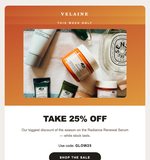
Aura promotional email from Pale Moon: 20% off the vitamin C serum with the code GLOW20
One email, any design

Write it once, switch the design

Every design of a type uses the same parts: the headline, the offer, the product, the button. So one email fits all of them, and changing the look never means rewriting it.

  • Aura promotional email from Pale Moon: 20% off the vitamin C serum with the code GLOW20
    AuraBrand-color hero, the product on color, the code inline and a bold pill button.
  • Ember promotional email from Pale Moon with the same 20% off serum offer
    EmberA serif offer headline, a dashed coupon and the product below.
  • Poster promotional email from Pale Moon with the same 20% off serum offer
    PosterA color-field poster with a big serif offer and two buttons.

Eighteen designs, hand-built for the inbox

Three or four designs for every type of email, from quiet and editorial to bold and colorful. Each one takes your brand colors.

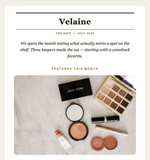
Top of the Aura design for Pale Moon serum
Aura Promotions
Top of the Poster design for Loam sneakers
Poster Promotions
Top of the Ember design for Hearth & Oat granola
Ember Promotions
Top of the Ticket design for the Truefuel whey protein offer
Ticket Promotions
Top of the Obsidian design for Noir Fig perfume
Obsidian Launches
Top of the Sticker design for Tidewell hand cream
Sticker Launches
Top of the Nova design for the Keystone keyboard
Nova Launches
Top of the Spotlight design for the Solenne sunglasses launch
Spotlight Launches
Top of the Kiosk design newsletter from The Larder
Kiosk Newsletters
Top of the Gazette design newsletter from Morrow Home
Gazette Newsletters
Top of the Journal design for the Ridgeway newsletter
Journal Newsletters
Top of the Bento design for the Little Grove newsletter
Bento Newsletters
Top of the Meadow design welcome email from Napwell
Meadow Welcome emails
Top of the Hearth design welcome email from Holm
Hearth Welcome emails
Top of the Letter design for the Shoreline welcome email
Letter Welcome emails
Top of the Harvest design harvest email from The Larder
Harvest Seasonal
Top of the Solstice design gift guide from Hearthside
Solstice Seasonal
Top of the Lantern design for the Aurelle gift edit
Lantern Seasonal
Ready for every inbox

Looks right on a phone, and in Outlook

Most emails are opened on a phone. Every design shrinks to one clean column on a small screen, with buttons big enough to tap.

  • Hand-built HTML. Table-based layouts made to hold up in Gmail, Outlook and Apple Mail.
  • The AI writes, the design renders. BrandyBee fills in the text, like the subject, the intro and the benefits. It never writes the HTML, so nothing breaks.
  • Discounts only from you. A coupon only appears when you add a real code. Without one, the offer block is left out.
Welcome to Napwell, here is 10% off Napwell
The Napwell welcome email on a phone, in one column
How it works

From product to inbox in three steps

  1. 01

    Pick the product and the email

    Choose products from your connected Shopify store or any product page URL, then the type: promotion, launch, newsletter, welcome or seasonal.

  2. 02

    Pick a design, add a line

    Choose one of the designs for that type and add a line about the offer or the story, or let BrandyBee decide.

  3. 03

    Send it from your email platform

    Copy or download the finished HTML, with its subject line and preview text, and paste it into the email platform you send from.

Works with
  • ShopifyImport your products and publish the results back to your store.
  • Instagram and FacebookPublish posts straight to your account and your Page.
  • GoogleSearch Console, Analytics and Merchant Center data, next to your products.
  • Any other storeAdd a product page URL and BrandyBee reads the product from it.

What makes a good ecommerce email

A good ecommerce email has one job: one product, one offer or one story, with one button. It shows the product big and early, says why it matters in a sentence or two, and makes the next step obvious.

It also sounds like your brand. Shoppers notice when an email reads like a template, so the copy should use your tone of voice and your real product details: the materials, the sizes, the price.

Subject lines and preview text

The subject line and the preview text decide whether the email is opened at all. Keep the subject short and specific, put the most interesting detail first, and use the preview text to add the second reason to open instead of repeating the subject.

Designing for every inbox

Design at 600 pixels wide, with one column that stacks cleanly on a phone. Use real text rather than text inside images, give every image alt text, and make buttons large enough to tap. Table-based HTML still renders most reliably across email clients, Outlook included.

Emails work best with strong images and posts around them. BrandyBee also makes product images without a photoshoot and social posts for every platform from the same product data.

FAQ

Questions about the email generator

An AI email generator writes marketing emails for you. BrandyBee writes the subject line, the preview text and the copy from your products and your brand voice, and lays them into a hand-built email design that is ready to send.

Promotions, product launches, newsletters, welcome emails and seasonal campaigns. Each type has its own designs.

Eighteen hand-built designs across the five email types. One written email fits every design of its type, so you can switch the design without rewriting anything.

Yes. Each email uses your brand colors and your tone of voice, and shows your real products with their photos and prices.

Yes. Every email comes with a subject line and preview text written for it, so it is ready for the inbox.

No. A discount code only appears when you add a real one. Without it, the offer block is left out of the email.

Yes. The designs are hand-built, table-based HTML made to hold up in the major email clients, on desktop and on phones. BrandyBee fills in the text; it never writes the HTML.

Yes. Copy the HTML or download it, and paste it into Klaviyo, Mailchimp or whichever email platform you send from.

Yes. Pick the email type, the design and the products, and add a line about the offer or the story you want. Or leave the brief empty and let BrandyBee choose.

Ecommerce brands that want product-led emails for launches, promotions and newsletters without designing each one from scratch.

Your next campaign is one brief away

Add a product, pick a type and a design, and get an email ready to send today.