Product Schema Markup for Ecommerce: What Google Needs, and What Most Stores Miss
What product schema needs for Google and AI shopping, which fields 103 Shopify stores leave out, and how to fix GTINs, policies and duplicate blocks.

Product schema is the hidden block of structured data on a product page that tells machines what the page sells: the name, the price, the stock, the barcode, the brand. Google reads it for its product results, Merchant Center checks your feed against it, and AI shopping agents read it when they look at your page. Shoppers never see it, which is exactly why it goes wrong without anyone noticing.
To see what stores actually put in it, I fetched 2,629 product pages from established Shopify stores across six categories and read the markup in the HTML each page sends. 182 of them had no product schema in JSON-LD, the format Google recommends: 108 had no product block at all, 36 had only a block that was not valid JSON, and 38, all from three stores, used the older microdata format instead. The numbers below cover the 2,447 pages from 103 stores that had it. The short version: themes get the basics right on almost every page. The fields that are missing are the ones that make a product eligible for richer results and that let Google match it to the same product elsewhere. Google's rules apply to every platform. I use Shopify for the step-by-step fixes, because that is where my data comes from.
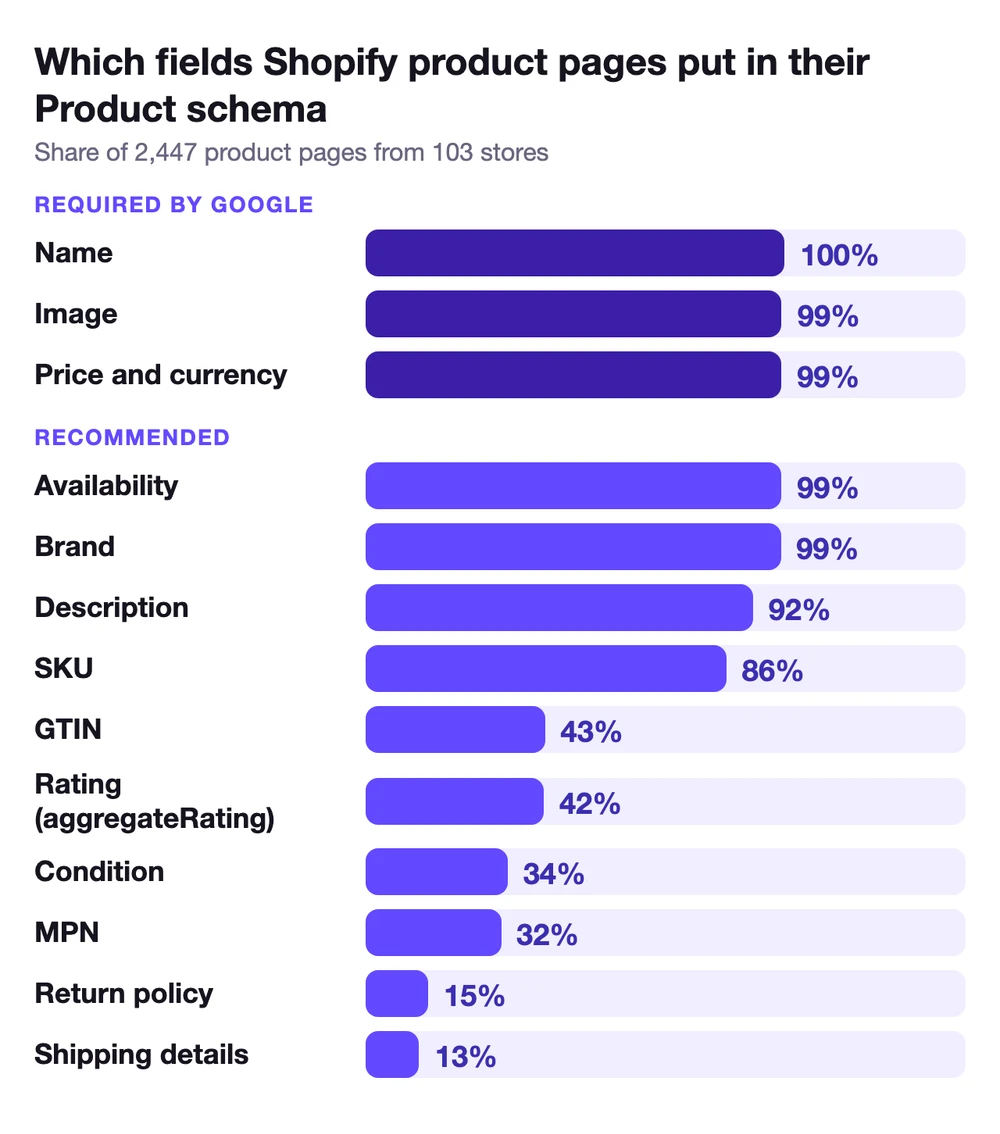
- Google requires only three things: a name, an image and an offer with a price and a currency. 98% of the pages with product schema had all three.
- The gaps are in the recommended fields. Only 43% of pages carried a GTIN, and 15% a return policy and 13% shipping details in their product markup.
- The barcode often gets lost on the way. When a product had a valid barcode in Shopify, the schema showed it only 62% of the time. Themes using Shopify's own structured data filter passed it almost every time.
- A quarter of pages carry two product blocks. 24% of pages had more than one, often a theme and an app each writing their own, and some of them disagreed on the price.
- Put shipping and returns at the store level. Google recommends one policy for the whole store, and settings in Search Console or Merchant Center take precedence over markup.
- Schema does not get a product picked on its own. In AI shopping, the feed decides the shortlist and the page has to tell the same story.
What is product schema, and what does Google require?
Product schema is structured data, usually written as JSON-LD in a script tag in the page's HTML, that describes the product with the vocabulary from schema.org. Google uses it for two kinds of results. Product snippets are for pages where a shopper cannot buy the product directly, such as review pages, and need one of a rating, a review or an offer. Merchant listings are for pages where a shopper can buy the product, which is every store's product page.
For a merchant listing, Google requires:
- name, image and offers on the Product.
- price and priceCurrency on the Offer.
Everything else is recommended: availability, brand, description, GTIN, MPN, SKU, condition, color, size, material, ratings, reviews, shipping details and the return policy. "Recommended" does not mean optional in practice. These are the fields that let Google match your product to the same product on other sites, show shipping costs and return windows in results, and trust that the page and your feed say the same thing. Google says it plainly: providing both structured data on your pages and a Merchant Center feed maximizes your eligibility.
Here is what the 2,447 pages carried:
What Shopify themes already get right
The required fields and the first recommended ones are on almost every page. Name, image, price, currency and availability were on 99% of pages, and a brand on 99%, though on Shopify the brand is usually the product's vendor field, so check that your vendor really is the brand. In at least 8 of the stores, it held something like a season, a product line or a placeholder. A field being there also does not mean it says much: the name is whatever your product title says, and in my study of 1,000 Shopify stores, 1 in 7 titles did not say what the product was.
On Shopify, some themes build the block with Shopify's own structured_data filter, which writes a Product for a product with no variants and a ProductGroup for one with variants. In my sample, 28 of the 103 stores used it, and the rest had markup written by the theme itself or by an app. 38% of the pages I read used ProductGroup, and 40% of products that had variants were still marked up as a single Product.
ProductGroup is how Google wants product variants described: one group with a group ID, and each variant as its own Product inside it. Of the ProductGroup blocks I found, 84% listed their variants and their group ID, but only 36% said what the variants differ by (variesBy, for example size or color). It is a recommended property, and it is the one that tells Google which of the variants is the blue medium. Shopify's own filter does not write it: none of the 381 ProductGroup blocks it produced in my sample had variesBy. Where the theme or an app wrote the markup instead, 59% did.
So if you are on a current Shopify theme, you probably do not need product schema from scratch. You need to fill the gaps in the one your theme writes, which can mean a change in the theme's code, and make sure nothing else writes a second one.
The fields most product pages leave out
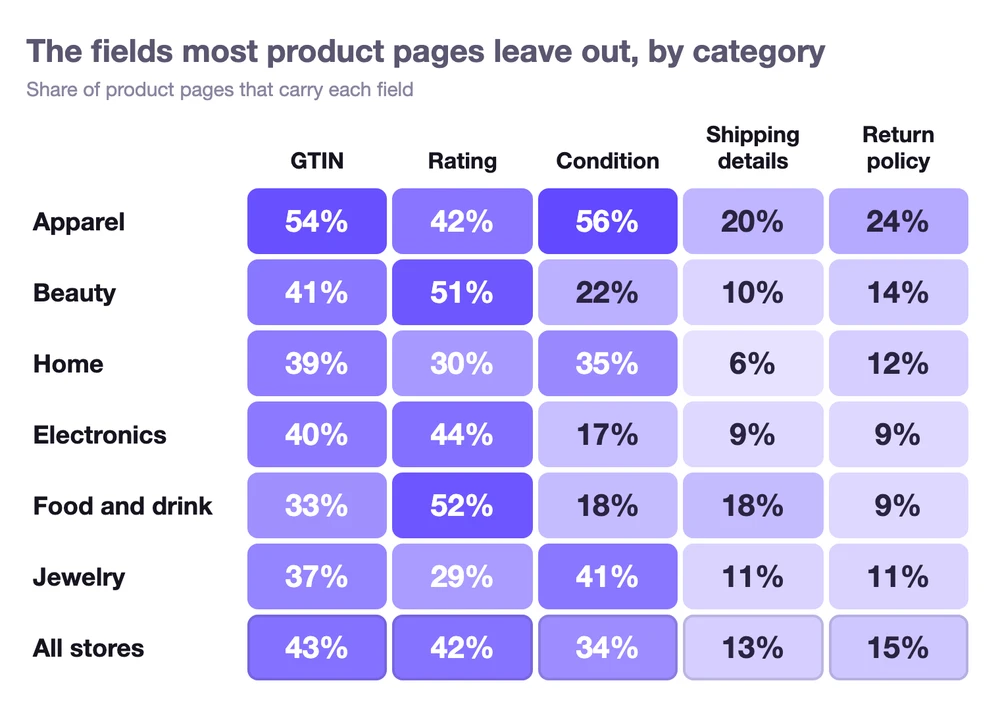 Apparel led on four of the five fields, with a GTIN on more than half of its pages and a return policy on 24%. Food and drink had the fewest GTINs, at 33%, and home the fewest shipping details, at 6%.
GTIN: the barcode that does not make it
Only 43% of pages carried a GTIN, and 42 of the 103 stores had none on any page I checked. On about one in nine of the pages that did carry one, the value was not a real barcode, usually the SKU. Some products without a GTIN genuinely have none, like store brands and handmade goods. But many do: 36 of the 42 stores with no GTIN in their markup had valid barcodes in Shopify on the products I checked. When a product had a valid barcode in Shopify, it reached the schema only 62% of the time. Themes that used Shopify's own filter passed it almost every time, on 418 of 419 pages. Everywhere else it got through on fewer than half.
The GTIN is the field that lets Google know your product is the same item other stores sell. It is also the field Merchant Center leans on, and I went through what happens when it is missing or wrong in why Merchant Center disapproves products.
Where to fix it. First, fill in the barcode on every variant in your store. Then check that your schema shows it, as gtin, gtin8, gtin12, gtin13 or gtin14, and that the value is the barcode itself, not the SKU. On Shopify, if the barcode is in the variant but not in the schema, the theme or the app that writes the markup is leaving it out. Look for a setting in the theme or the app first, and if there is none, the theme's developer can add the variant barcode to the block.
Shipping details and return policy
Only 13 of the 103 stores had shipping details in the markup on any product page I checked, and 18 had a return policy. Only 3 had a store-level return policy in that markup. Google suggests putting the store-level policy on one page, and settings in Search Console or Merchant Center cannot be seen from outside, so some stores may have set these where I could not see them. These are the fields behind the shipping cost and the return window that Google can show next to a product.
Google's own advice is to set them once for the whole store, not on every product. It recommends a return policy under your Organization markup, with offer-level policies only for the products that are different, and the same for shipping. It also tells you where each source ranks. From strongest to weakest:
- Shipping and return data in your Merchant Center product feed, and settings sent to Merchant Center through its API.
- Shipping and return settings in Merchant Center or Search Console.
- Product-level markup on the page.
- Store-level markup.
So if you already set shipping and returns in Merchant Center, those win and the markup is a fallback. If you do not use Merchant Center, the quickest route is the shipping and returns settings in Search Console, where it offers them for your site. If you want them in your markup too, add a store-level return policy to the Organization or OnlineStore block your theme already writes, on one page rather than every product. It looks like this:
{
  "@context": "https://schema.org",
  "@type": "OnlineStore",
  "name": "Your Store",
  "url": "https://www.yourstore.com",
  "hasMerchantReturnPolicy": {
    "@type": "MerchantReturnPolicy",
    "applicableCountry": "US",
    "returnPolicyCountry": "US",
    "returnPolicyCategory": "https://schema.org/MerchantReturnFiniteReturnWindow",
    "merchantReturnDays": 30,
    "returnMethod": "https://schema.org/ReturnByMail",
    "returnFees": "https://schema.org/FreeReturn"
  }
}
Google requires the country and the policy type, and the number of days when the window is limited. Instead of those, a link to your return policy page with merchantReturnLink also meets the requirement.
Ratings and reviews
42% of pages carried a rating (aggregateRating), and only 3% carried individual reviews. Food and beauty were highest, at about half of their pages. This is the field behind the stars in search results. One caution on this number: some review apps add their markup with JavaScript after the page loads, and my count only covers the HTML the page sends, so the real share for ratings may be higher.
If your product pages show reviews, check that the review app writes them into the schema too. If the rating is not in the structured data, the stars cannot appear next to the page in Google Search, however many reviews the page shows. If the app writes its own product block for this, it should carry the same price and stock as your theme's.
Condition, MPN and the rest
Condition (itemCondition) was on 34% of pages and MPN on 32%. Condition matters most for stores that sell used or refurbished items, and MPN for products without a GTIN, where brand plus MPN is how Google identifies them. Color and size were on 17% of pages. On a ProductGroup, these are what tell the variants apart.
The mistakes that break product schema
Missing fields cost you eligibility. Some mistakes do worse: they make the page contradict itself.
- Two product blocks. 24% of pages with product schema had more than one block, in 32 of the stores. It happens when the theme writes one and an app writes another, often a reviews or SEO app. On 17 pages, in 4 stores, the two blocks gave different prices for the same variant.
- Broken JSON. On 43 product pages, in 6 stores, a structured data block was not valid JSON at all, for example because of a trailing comma or a barcode written as a number with a leading zero. On 36 of them it was the only product markup on the page, so Google had no product schema to read there.
- A decimal comma. One store wrote its price as "69,99". Schema.org asks for a decimal point, so a parser can read that price as 6,999.
- An invalid stock value. Another wrote its availability as "schema.org/ InStock", with a space in the middle, which is not a valid value.
- Data that disagrees with the page. The schema says one price or stock status and the page says another. This is the one that gets products disapproved in Merchant Center.
Where to fix it. One block per product is the goal. If you keep a second one because it carries your star ratings, make sure both say the same price and stock. If you write the markup by hand, a product schema generator gets the format right: the right GTIN type for the barcode's length, a decimal point in the price and a valid stock value. Use its output to correct your theme's block, not to add another one: a pasted block keeps the price and stock you typed, so it falls behind the moment either changes.

How to check your product schema
Three checks catch almost everything:
- Google's Rich Results Test. Paste a product URL. It shows whether the page is eligible for merchant listings and product snippets, which fields are missing, and how many product items it found. If it lists the same product twice, the page usually has two blocks.
- Search Console. The merchant listings report shows errors and warnings from a sample of the product pages Google has crawled, so you see template problems, not just one page's.
- A machine's view of the page. The free product data checker shows what an automated shopper reads from your page: the structured data, the description, the images and whether crawlers can get in.
Check one product of each type you sell: a product with variants, one without, one on sale. Themes and apps often handle each differently.
If your products are missing from Google entirely, schema is rarely the cause. Start with indexing, and I went through that order in why Shopify products are not showing on Google.
Product schema and AI shopping
AI shopping agents read product pages, and that makes schema look like the key to being recommended. It is not quite that simple. In my AI shelf report, ChatGPT and Google AI Mode recommended products whose pages had no structured data at all, and every one of those was listed in Google Shopping. In that study, the feed was the far stronger signal for getting onto the shortlist.
Where schema matters is what happens next. An agent that opens your page and finds a price, a stock status and a description that match the feed has no reason to doubt it. One that finds two blocks with different prices, or an "out of stock" that the page contradicts, has every reason to. So treat the schema as the page's way of confirming the feed, not as a replacement for it. The description counts here too: 92% of pages had one in the schema, and it is one of the places an agent reads to understand what the product is for, so write descriptions that say what a product actually is.
How BrandyBee checks product schema
BrandyBee reads each product page's structured data, its barcode and its stock, and puts the result in the same fix list as the issues Google reports in Merchant Center. Type in a missing barcode and BrandyBee checks its check digit, or pick a category or fill in the Shopping attributes. Once you confirm, they are written straight to your Shopify product, and your Google feed picks them up on the next sync. You can see the fix list on the Merchant Center feed page.
What to fix first
Start with what makes the page contradict itself: a second product block with a different price, broken JSON, an invalid price or stock value. Then fill the gaps that cost you matching and eligibility: the GTIN wherever the product has one, and a store-wide shipping and return policy in Search Console, Merchant Center or your markup. The rest, like condition, MPN and variesBy, have to be written by the theme's markup. If your theme uses Shopify's structured_data filter, which writes neither condition nor variesBy, that means a change in the theme's code. More on getting found is in SEO and GEO.
Product schema statistics
The main numbers from this study in one place:
- Of 2,447 Shopify product pages with product schema, from 103 stores, 98% had all three fields Google requires for a merchant listing: a name, an image and an offer with a price and a currency.
- 182 of the 2,629 product pages I fetched had no product schema in JSON-LD.
- Only 43% of product pages carried a GTIN in their product schema, and 42 of the 103 stores had none on any page I checked.
- When a product had a valid barcode in Shopify, the barcode reached the product schema only 62% of the time. Themes using Shopify's
structured_datafilter passed it on 418 of 419 pages. - 24% of product pages, in 32 stores, had more than one product block, and on 17 pages in 4 stores the blocks gave different prices for the same variant.
- Only 13 of the 103 stores had shipping details in their product markup and 18 had a return policy. 3 had a store-level return policy.
- 42% of product pages had an aggregate rating in their schema, and 3% had individual reviews.
- 38% of product pages used ProductGroup, but only 36% of ProductGroup blocks said what the variants differ by (
variesBy), and 40% of products with variants were still marked up as a single Product.
Product schema FAQ
What is product schema markup?
It is structured data on a product page, usually JSON-LD, that describes the product for machines: its name, image, price, currency, stock, brand, barcode and more, using the schema.org vocabulary. Google uses it for product results and merchant listings, and AI shopping agents read it when they look at the page.
Does Shopify add product schema automatically?
Most current themes do, but what they write varies. Themes that use Shopify's structured_data filter write a Product for a product without variants and a ProductGroup for one with variants; in my sample, 40% of products with variants were still marked up as a single Product. Check whether yours outputs the barcode as a GTIN, and whether an app adds a second block.
Is product schema a ranking factor?
Google uses structured data to understand a page and to make it eligible for results like merchant listings and product snippets. Eligibility does not guarantee that a result appears, and schema does not replace the basics: an indexed page, a good product page and a clean feed.
Do I need a GTIN in my product schema?
Google lists it as recommended. If the product has a GTIN, put it in the schema, and make sure it is the same one as in your feed. If the product has none, like a store brand or a handmade item, send the brand and an MPN instead.
Should shipping and return policies go in product schema?
Google recommends one policy for the whole store, set in Search Console or Merchant Center or written once under your Organization markup. Product-level policies are for the products that are different. Settings in Merchant Center and Search Console take precedence over markup.
What is the difference between Product and ProductGroup?
Product describes one item. ProductGroup describes a product that comes in variants, like sizes or colors, with each variant as its own Product inside it. Google recommends a group ID (productGroupID), the list of variants and variesBy to say what the variants differ by, and each variant needs its own unique ID.