How to Optimize Google Shopping Ads: The Product Data Fixes That Matter Most
Google Shopping ads have no keywords. They run on your product data. Here are the fixes that matter most, with numbers from 1,000 Shopify stores.

Google Shopping ads have no keywords to bid on. Google builds them from your Merchant Center product data and decides which searches to show them on by reading that data, starting with the title. So most of what optimizing a Shopping ad means happens before you open Google Ads: in the title, the main image, the barcode, the price and the stock of each product.
That data now carries most of the spend. Performance Max took 67% of Shopping ad spend among advertisers running both campaign types in the first quarter of 2026, up from 53% a year earlier, and across thousands of retail campaigns 74% to 97% of Performance Max cost went to feed-based ads. For a retailer, a Performance Max campaign is mostly a Shopping campaign with your product data at its center.
To see where that data usually falls short, I used my study of 1,000 Shopify stores popular with US shoppers: 196,484 products, with 10,000 titles and 10,000 main images checked one by one by an AI model and spot-checked by hand. Most of these are each store's newest products. Below are nine fixes, and the order I would make them in is at the end.
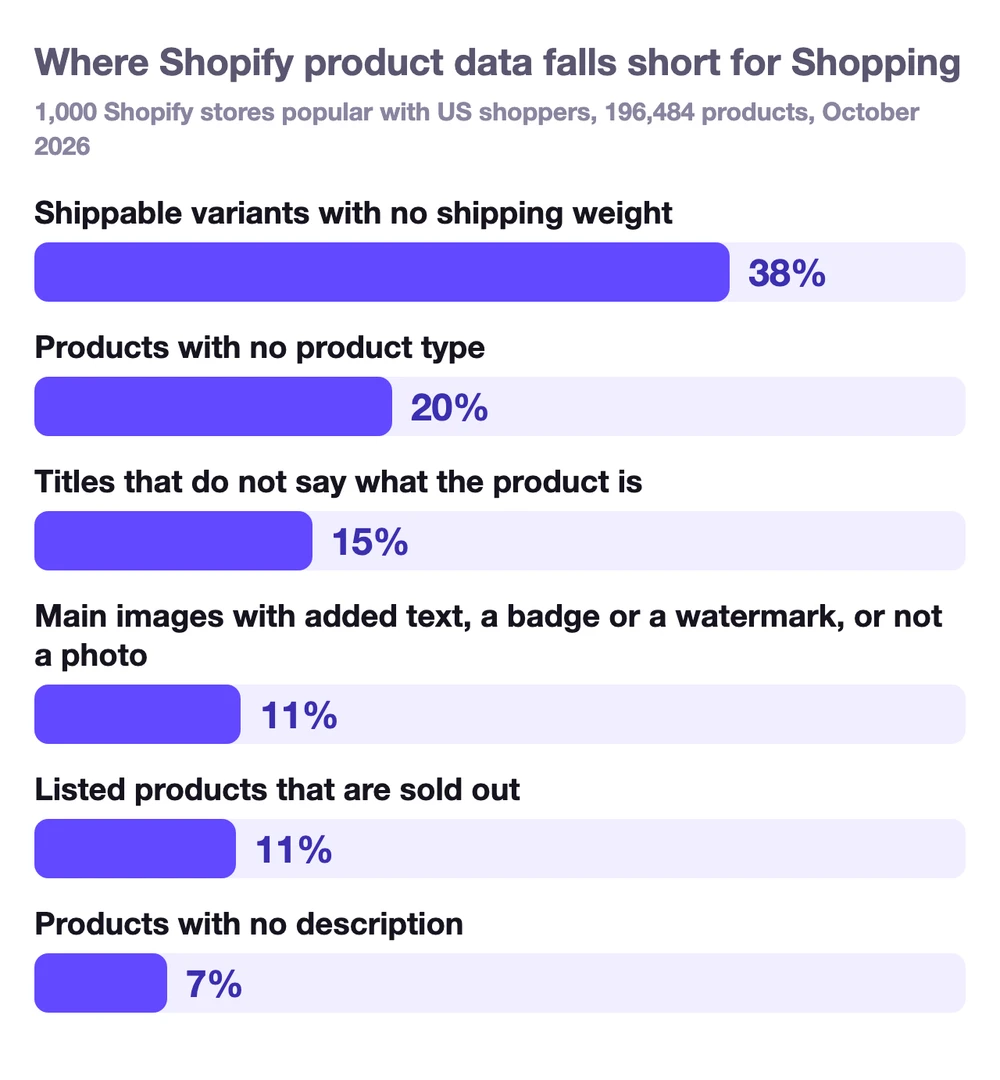
Not all of these hold an ad back. A missing weight only matters if your shipping rates use weight, a sold-out product should stay out of ads anyway, and a missing product type costs you control rather than reach. The ones that cost reach are the titles and the images: one title in seven does not say what the product is, and about one main image in nine carries something Google does not allow.
How do Google Shopping ads work?
You send your products to Google Merchant Center, usually through a feed or, on Shopify, the Google & YouTube app. Google reads each product's title, description, image, price and attributes, and when someone searches, it picks the products that match and runs an auction. You pay when someone clicks.
The same product data feeds more than the ads. It powers Google's free product listings, which have been free on the Shopping tab since April 2020, and Shopping ads from existing campaigns are eligible to show in AI Overviews. Google says people shop across Google more than a billion times a day, drawing on over 60 billion product listings. When ChatGPT and Google AI Mode recommend products, they lean on the same kind of data, which is what I found in my AI shelf report.
Two campaign types use it. A standard Shopping campaign gives you control over which products get which bids. Performance Max, which replaced Smart Shopping in 2022, runs your products across all of Google's ad inventory from one campaign and decides most of the bidding itself. Either way, the campaign can only be as good as the products you give it.
How to optimize Google Shopping ads
1. Write titles that match how people search
The title is the closest thing a Shopping ad has to a keyword. Google says your title will be used to match your product to a customer's search. It allows 150 characters, says most shoppers only notice the first 70 or so, and asks you to put the most important details first.
Most stores use a fraction of that. The typical title in my data is 35 characters, 41% are 30 characters or less, and only 10% go past 70. Short is fine when the words are the ones people search for. The problem is when they are not: 15% of the titles checked did not say what the product was: a product name, a shade, a model number. "Juniper" might be a dress on your site, where the photo explains it. In a Shopping auction it gives Google very little to match a search to.
For clothing, Google's apparel guide spells out the order: brand, then product type, then the attributes shoppers search for, such as color, size, material and pattern, and it also suggests the gender. That last one is worth judging product by product. "Wrap dress" already tells a shopper who it is for, and only about 15% of the titles from clothing stores in my data name a gender or age at all. Where the same product is made for more than one group, like a shirt, jeans, sneakers or a jacket, the gender is often the word that decides whether you match a search for "men's linen shirt".
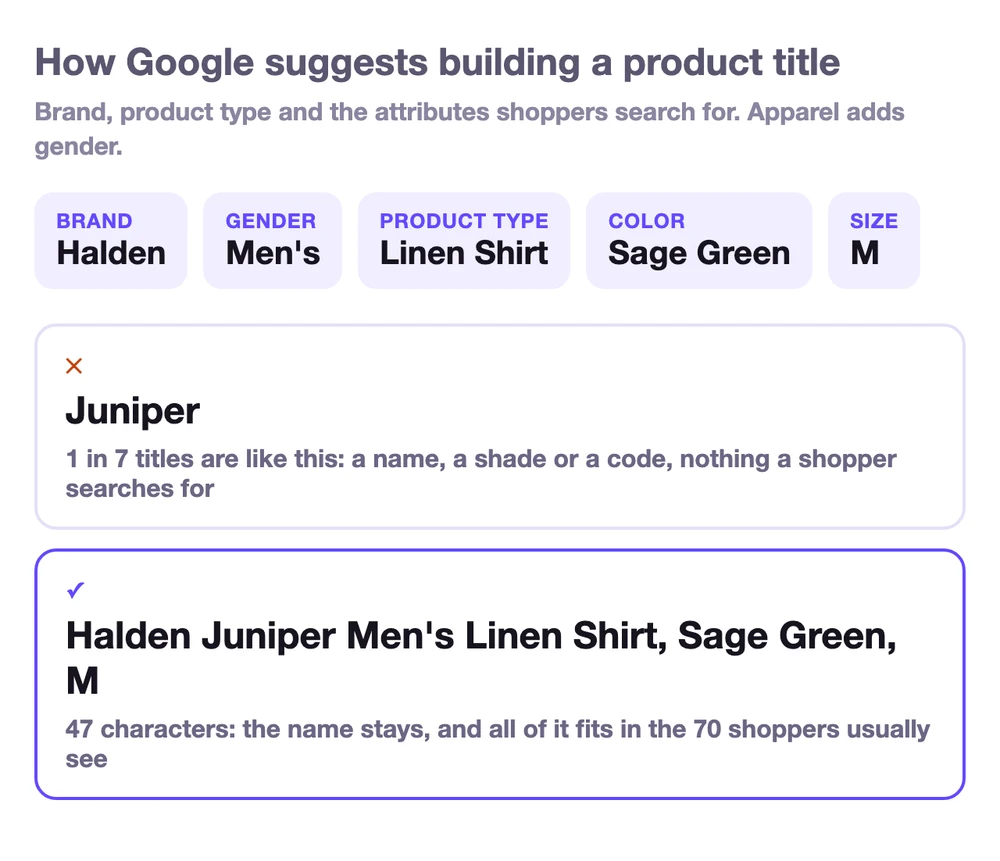
You do not have to lose the product name to do this. Keep it, and add what it is. On Shopify, the Google & YouTube app lets you choose whether Google gets your product title or your SEO title, so you can keep a short name on the page and send a descriptive one to Google.
2. Clean up the main image
The main image is half the ad. Google does not allow promotional text, calls to action, watermarks or borders on it, recommends the product fill 75% to 90% of the frame, and from January 31, 2027, requires it to be at least 500 by 500 pixels for every product.
In my data, about 1 in 9 main images had something Google's rules do not allow: a price, a "New!" or "Free gift" badge, feature call-outs, a watermark, or a logo in place of the product. 34% of stores had at least one among the 10 checked. Another 2.7% of main images were under 500 pixels, and 31% of stores had at least one of those. Google can disapprove a product for its main image, so this one is worth checking first. What the other images should show depends on the category, and I went through each one in how many images a product page needs.
The fix is to keep badges and call-outs for your own product page, send Google the clean photo, and put lifestyle, scale and detail shots in the additional images. If some of those are made with AI, Google asks you to keep the metadata that marks them as AI-generated.
3. Add GTINs wherever your products have them
A GTIN, the barcode number on the box, tells Google your product is the same item other stores sell, so it can show you in the right comparisons. Google says retailers who added correct GTINs saw a 20% increase in clicks on average. In my study of Merchant Center problems, products with no barcode ran from 7% in apparel to 48% in food and drink, and some stores had invalid ones too, which is worse than none. Both are covered in why Merchant Center disapproves products. On Shopify, the GTIN goes in each variant's barcode field.
If you make your own products and they have no GTIN, that is fine. Send the brand and an MPN instead. If a product has neither, for example a handmade or custom item, mark it as a custom product in the Google & YouTube app.
4. Send every variant with its color and size
52% of the products in my data have variants, and in apparel, 77% of products come in more than one size. Google treats each variant as its own product, grouped by an item group ID, and for apparel sold in the US, UK, Germany, France, Japan and Brazil, Shopping ads require a color, a gender and an age group, plus a size for clothing and shoes. A variant without them can be disapproved for Shopping ads.
This matters for clicks too. A shopper who searches for a size or a color should land on that variant, with its own image and its own stock, not on a product page where they have to pick it again.
5. Show sale prices the way Google can display them
25% of the newest products in my data are on sale, at a typical 30% off. Google can show a sale in your ad, with the original price crossed out next to the sale price, but only on its own terms. In the US the discount has to be more than 5% and less than 90%, the original price has to have been charged for at least 5 of the last 30 days or 15 of the last 200, and both prices should be on the product page.
Send the sale price as a sale price, not by lowering the regular price, and make sure it matches what the page shows. Google can also add a "price drop" label on its own when a fairly stable price drops significantly below your average for the last 60 days.
6. Keep stock and price in sync with the page
11% of the products listed in these stores are sold out. A product marked out of stock in your feed is kept out of most shopping experiences, which is what you want. The problem is a mismatch. If the page says in stock and the feed says out of stock, Google can disapprove the product, and the same goes for a price that differs from the page.
On Shopify, the feed usually follows the store on its own. Mismatches usually come from the page: a theme or an app writing product schema with an old price, or a stock status that does not update.
7. Fill in shipping weight if your rates use it
38% of shippable variants in my data have no shipping weight. That sounds alarming, but Google only needs a weight if your shipping settings are based on it, such as carrier-calculated rates. If you charge a flat rate or ship free, a missing weight changes nothing. If you use weight-based rates, fill it in, or Google cannot work out the shipping cost and can disapprove the product.
What shipping can do for an ad is a label. If you offer free shipping that is also fast, Google can show a free and fast shipping annotation on the ad.
8. Write a real description
Google requires a description for every product and says a detailed one helps it show your product to the right customers. 7% of the products in my data have none, and the typical description is about 80 words. Say what the product is, what it is made of, who it is for and how it is used, in plain sentences, with the words people search for. A description written from the product's real details, not from marketing copy, does most of that by itself.
9. Use product types and custom labels to structure your campaigns
The last fix is about control rather than reach. Google uses the product type attribute to structure bidding and reporting in Shopping campaigns, and custom labels, which shoppers never see, to filter products in Performance Max and Shopping campaigns. Good uses for custom labels are margin, bestsellers, season and items on sale, so you can bid harder where it pays.
20% of the products in my data have no product type in Shopify, 61% of stores have at least one without, and 7% of stores leave it empty on everything. Without one, you lose your own way of grouping products in campaigns and reports, and fall back on Google's category, the brand or individual item IDs. Set them at the source your product feed is built from, not in Merchant Center, so the next sync does not undo them.
Where to start
Start with what can stop a product from showing at all: main images Google does not allow, invalid barcodes, missing apparel attributes, and stock or prices that disagree with the page. The free product data checker shows whether a page's markup agrees with the price and stock it displays. Then fix what decides which searches you show up for: titles that say what the product is, and missing GTINs. Leave weights, descriptions and labels for last, unless your shipping rates depend on weight.
Google Shopping ads statistics
- Performance Max accounted for 67% of Google Shopping ad spend in Q1 2026 among advertisers running both Performance Max and standard Shopping campaigns, up from 53% a year earlier. Google Shopping ad spend grew 18% year over year. (Tinuiti)
- Typically 74% to 97% of Performance Max cost comes from feed-based ads, across thousands of retail campaigns in more than 500 accounts. (smec, 2025)
- 55% of advertisers do not use a product feed in their Performance Max campaigns, across 9,199 accounts that mix ecommerce and lead generation. (Optmyzr, 2024)
- Retailers who added correct GTINs saw a 20% increase in clicks on average. (Google)
- People shop across Google more than a billion times a day, and Google's Shopping Graph holds over 60 billion product listings. (Google, 2026)
- 52% of Shopify products have variants, and 77% of apparel products come in more than one size, so each size has to go to Google as its own item.
- 20% of Shopify products have no product type, and 7% of stores leave it empty on every product.
The Shopify numbers come from 196,484 products in 1,000 Shopify stores popular with US shoppers, October 2026, mostly each store's newest products. The rest of that data, from title length to discounts, is in the full report.
Google Shopping ads FAQ
Do Google Shopping ads use keywords?
No. Google builds Shopping ads from your Merchant Center product data and matches them to searches mainly through the title and the rest of the product data. You can add negative keywords to keep products off searches you do not want, but you cannot bid on keywords the way you do in a search campaign.
How do I improve my Google Shopping ads?
Start with the product data: titles that say what the product is with the details people search for, clean main images, correct GTINs, color and size on every variant, sale prices Google can display, and stock and prices that match the product page. Then structure campaigns with product types and custom labels so you can bid more on what earns most.
How long should a Google Shopping title be?
Google allows up to 150 characters and shows shoppers the first 70 or fewer, so the important details belong at the start. The typical Shopify title is 35 characters. That is enough when the words are the right ones, but it often leaves out what the product is or details shoppers search for, like the color, size or material.
Why are my Google Shopping ads not showing?
The usual causes are a disapproved product in Merchant Center, for example a main image with promotional text, a price or stock mismatch with the page, or missing color, size, gender or age group on clothing. Other causes are a budget or bid too low to win the auction, or a title that does not match what people search for. Merchant Center's Products section lists the issue for each product. If products are missing from Google altogether, not only from ads, the cause is often indexing, which I went through in why Shopify products are not showing on Google.
Is Performance Max better than standard Shopping?
Neither is better for every store. Performance Max reaches more of Google's inventory and runs most of the bidding itself, and in its own early tests in 2021, Google reported an average 12% increase in conversion value at the same or better return on ad spend for campaigns moved from Smart Shopping. A standard Shopping campaign gives you more control over individual products and searches. Both run on the same product data, so fixing that data helps either one.