Why Are My Shopify Products and Collection Pages Not Showing on Google?
A product can be stuck in three different places before it ever ranks. Here is how to find which one, and how to build collection pages that match what people actually search.

"My Shopify products are not showing on Google" is one of the most repeated questions in the Shopify forums, and almost every thread gets the same unhelpful answer: wait, or submit your sitemap.
The reason that answer fails is that "not showing" is three different problems wearing one name. A product can be missing because Google never indexed it, because Merchant Center rejected it, or because Google knows it perfectly well and ranks it on page four. Each has a different fix, and fixing the wrong one changes nothing.
This post walks through them in order, then spends most of its time on the one almost every store gets wrong: collection pages. Those are the pages that match what people actually type into Google, and most stores leave them as a bare grid of products.
- Check three layers in order: is the page indexed, is the product approved in Merchant Center, and does the page win its search. A later layer cannot fix an earlier one.
- Collection pages match the searches that buy. People type "women's waterproof hiking boots", not your product name. A collection page is the page built for that search.
- Write the collection page for one phrase. That phrase becomes the H1, and the title, meta description and URL follow it.
- Fill the page like a shop, not a list. Several models across several price points, a short intro, copy below the grid and an FAQ taken from real questions.
- Do not guess the phrase. Look up the volume and read what already ranks. If page one is full of collection pages, you need one too.
- Then measure. Impressions in Search Console move first, rankings later, sales last.
Which of the three layers is your problem?
Before changing anything, find out where the product is actually stuck.
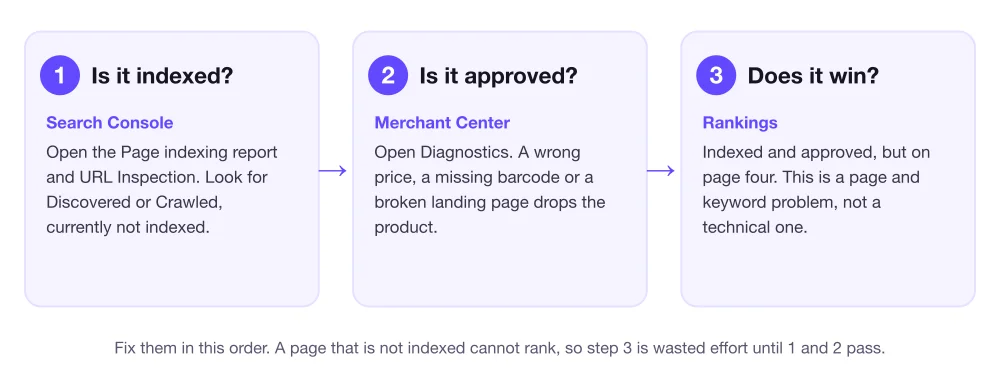
Layer 1: indexed. Paste the exact URL into the URL Inspection bar at the top of Search Console. It tells you whether Google has the page. "URL is not on Google" with a reason such as "Discovered, currently not indexed" or "Crawled, currently not indexed" means the page is in the pipeline but Google has not judged it worth keeping. The Page indexing report lists every page Google left out, with the reason. A page that is not indexed cannot rank for anything, so nothing below matters until this is fixed.
A quick sanity check is to search site:yourstore.com/products/your-product-handle in Google. If it returns nothing, the page is not indexed.
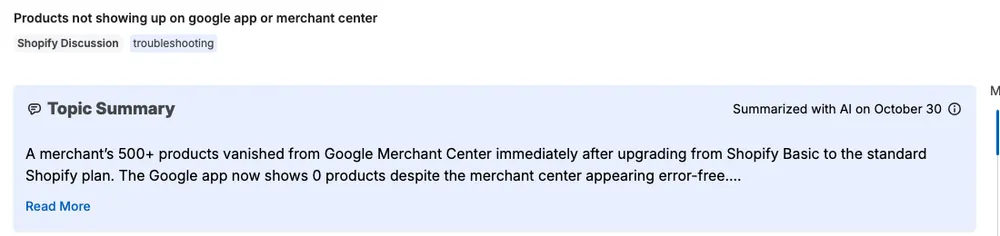
Layer 2: approved. This one concerns Google Shopping and the free product listings, not the normal blue links. Open the diagnostics area in Google Merchant Center. Products drop out here for boring reasons: a price in the feed that does not match the price on the page, a missing barcode where one is required, a missing image, or a landing page Google cannot read. If the Google and YouTube app in Shopify says you have zero products synced, as in the thread above, start here and not in Search Console. Google publishes the full product data requirements. I went through each cause, and how often it shows up, in why Merchant Center disapproves products.
Most Merchant Center problems are fixed in the data on your own store, not in Google. If your feed is the issue, this is the job BrandyBee's product feed optimization does: it reads your Merchant Center feed next to the live pages and tells you which products Google rejected and why.
Layer 3: ranking. The product is indexed and approved, and it still does not appear for the search you expected. Nothing is broken. The page is simply not the best answer, or it is answering a different question than the one the shopper typed. This is the biggest layer by far, and it is where the rest of this post lives.
Why a better title tag will not fix it
Many stores that reach layer 3 go straight to the same fix: rewrite the meta title. Sometimes it helps. Usually it does not, because the real gap is bigger than the tag.
Shopify SEO apps will tidy that tag for you, along with the alt text and the schema. They do not tell you which phrase the page should go after, and they do not look at who already ranks for it. I went through all of them in my breakdown of what the app store actually sells, and that research question is the one none of them answers. If you have a green audit and a page that still does not show, this is almost always why.
Collection pages are where the buying searches land
Think about how people shop on Google. Hardly anyone types the name of a product they have never heard of. They type a category with a few qualifiers: "women's waterproof hiking boots", "14k gold hoop earrings", "standing desk for small spaces". The page that fits that search is a collection page, not a single product page.
In Turkey, for example, jewelry shoppers commonly type the material, the product and a request for models and prices all in one search. The point is not that your store should copy that pattern. The point is that shoppers describe a category plus the details they care about, and the page that wins is the one built around exactly that phrase.
Do not assume English shoppers search the same way
That Turkish pattern is a local habit. I could not find a measured study of how English-speaking shoppers phrase category searches, and the advice that exists comes from tool vendors who do not publish their numbers. What English queries do tend to show is a product plus one or two modifiers: a material, an audience, a price ceiling ("under $100") or a use ("for small kitchens"). Which of those carries volume for your products is something you look up, not something you assume.
So test it for your own category:
- List your seed phrase. For example, "hiking boots".
- Add each kind of modifier one at a time: audience (women's), feature (waterproof), price (under $150), use (for winter).
- Look up the volume for each variant in a keyword tool for the country you sell in. Phrasing and volume differ between the US, UK, Canada and Australia.
- Open the results page for the best candidates and read it.
That last step is the one most stores skip. If page one is mostly collection pages from other stores, Google wants a collection page for that phrase, and you need one. If page one is mostly guides and "best of" lists, a collection page will struggle, and a guide that links into your collection is the better move. BrandyBee's keyword and competitor tracking does this lookup for you, including which terms your competitors rank for and where, refreshed weekly.
Build the collection page for one phrase
Once you have the phrase, every part of the page should point at it.
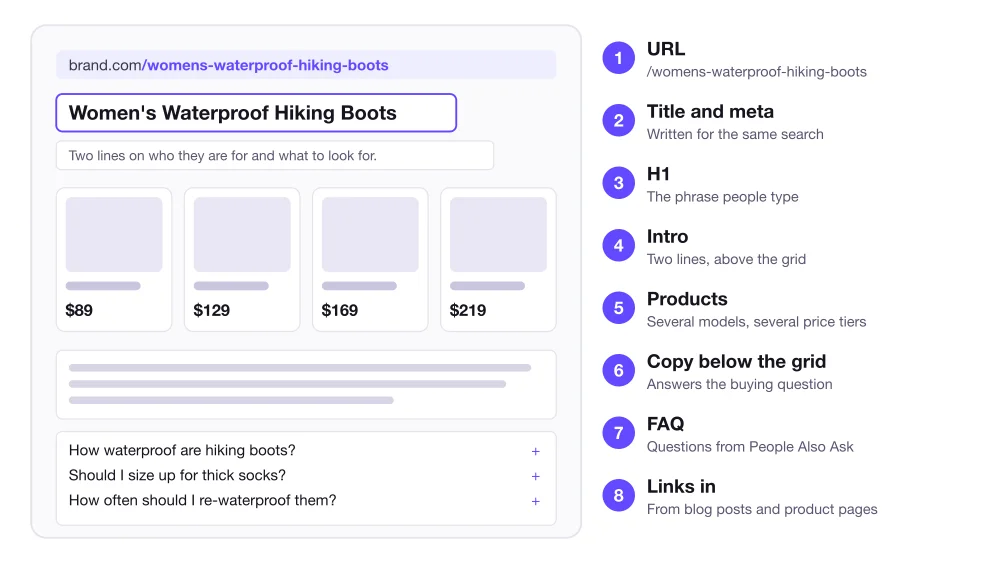
1. The URL. Keep it short and plain: /collections/womens-waterproof-hiking-boots. In Shopify this is the URL handle, and Google has its own guidance on ecommerce URL structure. If you change an existing one, tick the option to create a redirect so you keep what the old URL earned.
2. Title and meta description. Edit them in the "Search engine listing" section of the collection. Write both for the same search as the H1, and write the description for a shopper deciding whether to click, not for a crawler. Google may rewrite either one, as it explains for title links and meta descriptions, but a clear one is still your best shot.
3. The H1. This should be the phrase people type, in normal words. Not a clever brand line. If you are targeting "women's waterproof hiking boots", the H1 is "Women's Waterproof Hiking Boots".
4. A short intro. Two lines above the grid that tell the shopper who the products are for and what to look for.
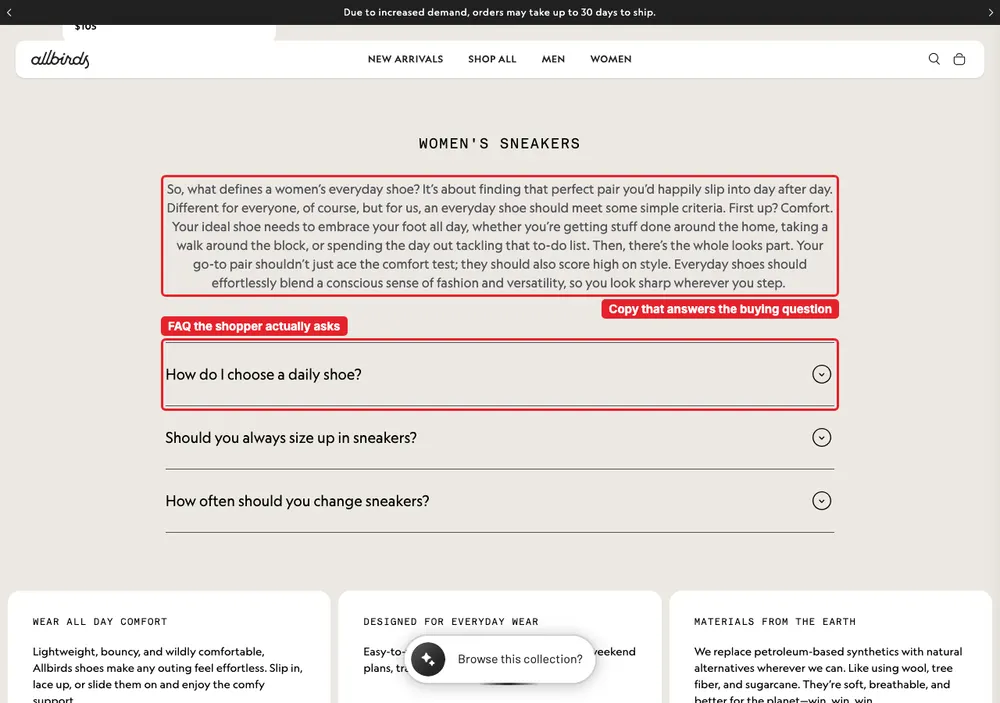
5. Products across the range. A page with six near-identical items looks thin to a shopper and to Google. Show different models at different price points, so someone searching at any budget finds something that fits. Allbirds' women's sneaker collection is a good example: when I looked, it listed 145 products at many different prices.
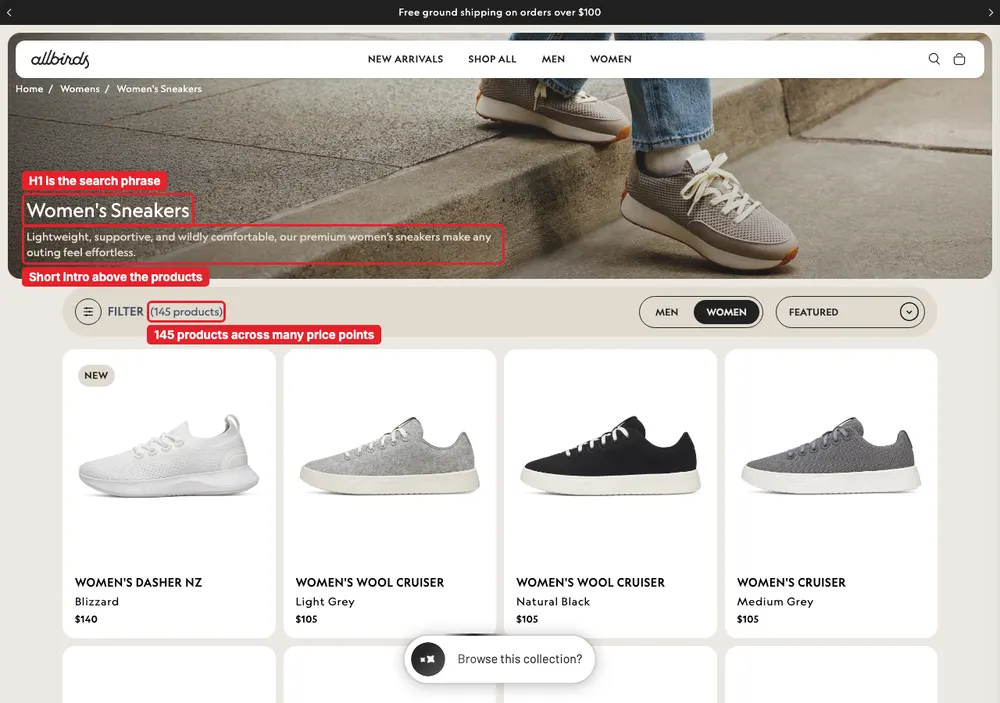
6. Copy below the grid. This is where you answer the buying question in plain words: how to choose, what the differences are, what matters. The same page puts it under a second heading that repeats the category name.
7. An FAQ. Take the questions from the "People also ask" box for your phrase, and answer each in two or three sentences. Three good questions beat ten padded ones.
8. Links in. A collection page that nothing links to is hard for Google to value. Link to it from your relevant product pages and blog posts, using words that describe what the shopper will find, such as "women's waterproof hiking boots" and not "click here" or "see more". Vary the wording across pages instead of repeating one exact phrase everywhere.
A quick note on tooling. BrandyBee's category page optimization is on its way and is not something you can use today, so everything in this section is the manual method. It works without any app.
Filters and page two are not the pages you want to rank
A collection with filters and more than one page produces URLs that look like new pages to Google: ?page=2, a colour filter, a price filter, a sort order. They are the same list in a different state, and they can crowd out the one page you built.
Google's own guidance is specific about this:
- Each page of a sequence gets its own URL and its own canonical. Do not point every page at page one. Pages in a sequence can reuse the same title and description. Pagination guidance.
- Filtered and sorted versions are duplicates of the list. Keep them out of the index with a
noindextag, or stop Google crawling those parameters in robots.txt. Pointing their canonical at the unfiltered page also works, but Google says blocking is more effective in the long run. Faceted navigation guidance. - Page links must be real links. A "load more" button or infinite scroll needs crawlable
<a href>links behind it, because Googlebot does not click buttons.
To see what your own store does, open a filtered collection URL, view the page source and search for canonical. If a filtered address names itself as the canonical, it is competing with your main collection page. Shopify lets you change what robots.txt blocks through the robots.txt.liquid template.
Get the pages indexed
New and updated pages do not appear on their own schedule. Tell each service they exist.
- Google Search Console. Add your site, submit the sitemap at
yourstore.com/sitemap.xml(Shopify generates it for you, and Google explains what a sitemap does), then use URL Inspection on the handful of pages that matter most and request indexing. There is a daily limit on those requests, so use them on your key collections and best sellers, not on every URL. - Bing Webmaster Tools. You can import your site straight from Search Console and submit the same sitemap. Bing is a small share of traffic for most stores, and it is a few minutes of work.
- Google Merchant Center. Make sure your site is verified and claimed, the feed is syncing, and Diagnostics shows no blocking errors.
BrandyBee does not submit pages for you. That part is done in those three tools, and it takes under an hour.
Make the product pages worth ranking
A strong collection page sends shoppers to products, and the product page has to hold up when they arrive. I cover why traffic does not turn into orders in why a store gets traffic but no sales, so here is only the short version.
- Many clear images. Different angles, a detail shot, the product in use. Shoppers cannot touch it, so the photos do the work. I counted how many images product pages in each category use, and which ones, in how many images an ecommerce product page should have.
- A description that answers questions. Materials, sizing, care, who it suits. Not the supplier's paragraph, which every other store also publishes.
- Reviews that are easy to use. Put them high on the page and let shoppers sort and filter them.
- A fast, plain page. Nothing that makes a shopper work to find the price or the buy button.
This is the part BrandyBee does for you. It looks up the term and its live search volume before it writes anything, reads what already ranks, then writes the whole page: title, every section, FAQ and the meta underneath. It generates product images without a photoshoot and publishes straight to Shopify after you review it in a visual editor. You can see the writing side first with the free product description generator, and the wider page builder comparison covers why most builders stop at layout. If you want the copy side only, product descriptions written against a real keyword is the focused version.
Reuse the work in ads and social
Once a product and its page are right, you already hold what ad and social posts need: the phrase, the benefit, the photos. BrandyBee turns the same product into ad creatives and social posts from that data, so the message stays consistent from the search result to the post to the page.
Check whether it worked
Do not judge by whether a page "feels" visible. Look at the numbers, and look in the right order.
In Search Console, open Performance and filter by the page. Impressions usually move first: Google starts showing the page for more searches. Clicks follow as the position improves. Orders come last. Shopify's own SEO specialist puts meaningful results at three to six months, so compare weeks against weeks and do not panic at a bad first fortnight.
You can do this by hand in Search Console and GA4. BrandyBee pulls Search Console and GA4 data per product page and will track your keyword rankings for the phrase each page was written for, so you see whether the rewrite moved anything without building the report yourself.
Specific, well structured pages also matter for AI shopping answers. I tested that in how ChatGPT and Google AI Mode pick products.
Shopify products and pages not showing on Google FAQ
Why are my Shopify products not showing on Google?
They are stuck in one of three places: not indexed by Google, not approved in Merchant Center, or indexed but ranked too low to see. Check them in that order, because a page that is not indexed cannot rank no matter how good it is.
How long does it take for a new Shopify product to appear on Google?
It varies from days to several weeks. Submitting your sitemap and requesting indexing for important pages helps, but it does not guarantee speed. Ranking well for a competitive phrase takes longer still, commonly months.
Do I need the Google and YouTube app to appear in Google search?
No. It syncs your products to Merchant Center for Shopping and free product listings. Normal search results depend on Google indexing your pages, which is a separate thing handled through Search Console.
Should I request indexing for every page?
No. The request has a daily limit and Google may not act on it for pages it does not consider valuable. Use it for your main collections and best sellers, and let the sitemap cover the rest.
Do Shopify collection pages need a description?
For the collections you want to rank, yes. A bare grid of products gives Google very little text to understand the page and gives the shopper no help choosing. Write a short intro above the products, a block of useful copy below them, and a few real questions.
Is it worth submitting my store to Bing?
Usually yes, because it costs a few minutes. You can import the site from Search Console. Bing sends a small share of traffic for most stores, and the setup is quick.
Why is my page indexed but still not ranking?
Because indexing only means Google has the page. Ranking depends on whether the page targets a phrase people actually search, how well it answers that search, and who else competes for it. Look up the phrase and read the current results before rewriting anything.